



























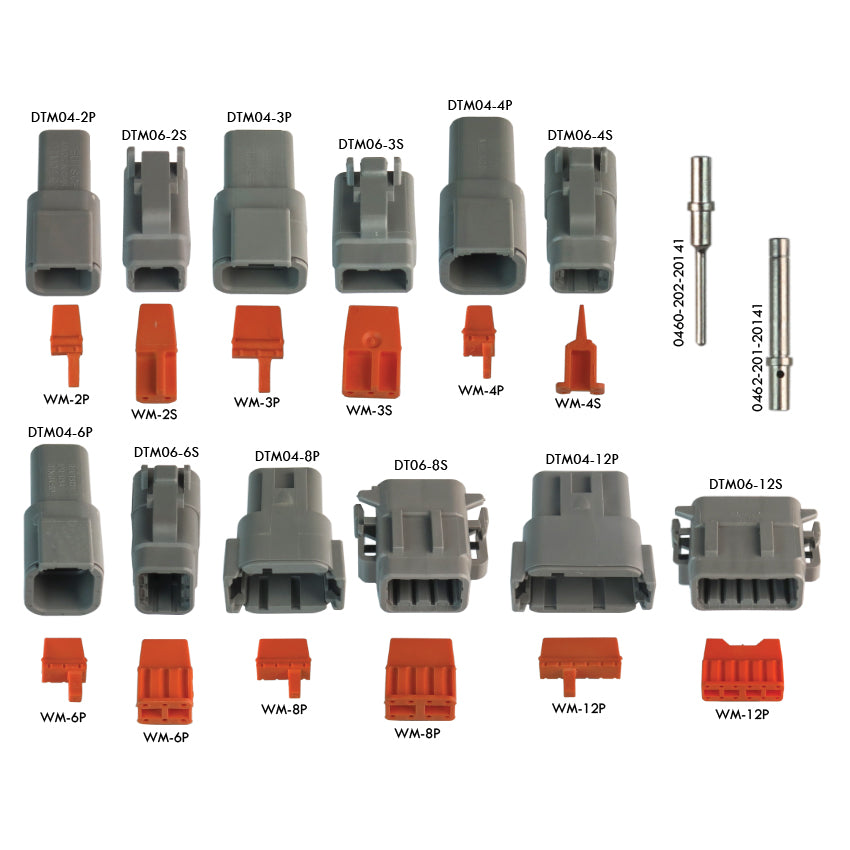
KIT-D-DTM
Deutsch DTM Series Connector Repair Kit (KIT-D-DTM)
1 - Deutsch 2-Pin Grey Connector Receptacle Mini Housing
1 - Orange Wedge Lock on 2-Pin DTM Series w/ Male Pins
1 - Deutsch 2-Pin Grey Connector Plug Mini Housing
1 - Orange Wedge Lock on 2-Pin DTM Series w/ Female Sockets
1 - Deutsch 3-Pin Grey Connector Receptacle Mini Housing
1 - Orange Wedge Lock on 3-Pin DTM Series w/ Male Pins
1 - Deutsch 3-Pin Grey Connector Plug Mini Housing
1 - Orange Wedge Lock on 3-Pin DTM Series w/ Female Sockets
1 - Deutsch 4-Pin Grey Connector Receptacle Mini Housing
1 - Orange Wedge Lock on 4-Pin DTM Series w/ Male Pins
1 - Deutsch 4-Pin Grey Connector Plug Mini Housing
1 - Orange Wedge Lock on 4-Pin DTM Series w/ Female Sockets
1 - Deutsch 6-Pin Grey Connector Receptacle Mini Housing
1 - Orange Wedge Lock on 6-Pin DTM Series w/ Male Pins
1 - Deutsch 6-Pin Grey Connector Plug Mini Housing
1 - Orange Wedge Lock on 6-Pin DTM Series w/ Female Sockets
1 - Deutsch 8-Pin Grey Connector Receptacle Mini Housing
1 - Orange Wedge Lock on 8-Pin DTM Series w/ Male Pins
1 - Deutsch 8-Pin Grey Connector Plug Mini Housing
1 - Orange Wedge Lock on 8-Pin DTM Series w/ Female Sockets
1 - Deutsch 12-Pin Grey Connector Receptacle Mini Housing
1 - Orange Wedge Lock on 12-Pin DTM Series w/ Male Pins
1 - Deutsch 12-Pin Grey Connector Plug Mini Housing
1 - Orange Wedge Lock on 12-Pin DTM Series w/ Female Sockets
35 - Mini Female Deutsch Sockets, Size 16/18
35 - Mini Male Deutsch Pins, Size 16/18
1%20-%20Deutsch%202-Pin%20Grey%20Connector%20Receptacle%20Mini%20Housing1%20-%20Orange%20Wedge%20Lock%20on%202-Pin%20DTM%20Series%20w/%20Male%20Pins1%20-%20Deutsch%202-Pin%20Grey%20Con...)
Choose options